Most of the articles which focus on Sling Model Exporter (like this one) tell us how to configure exporter for our models. But none of them really tells how to develop custom Sling Model Exporter. I will try to fill this gap.
So let’s imagine, that instead of json, we want to receive Sling Models in a human-readable yaml format. But OOTB we have the ability to export only as JSON. To have it as a yaml, we need to provide our custom implementation of ModelExporter interface. We are not going to invent the wheel, so let’s first add a dependency to Jackson, as it’s already used by Sling for json export:
<dependency>
    <groupId>com.fasterxml.jackson.core</groupId>
    <artifactId>jackson-databind</artifactId>
    <version>2.8.4</version>
    <scope>provided</scope>
</dependency>
<dependency>
    <groupId>com.fasterxml.jackson.dataformat</groupId>
    <artifactId>jackson-dataformat-yaml</artifactId>
    <version>2.8.4</version>
</dependency>
jackson-databind is already provided by Sling/AEM and we just need to add yaml data format.
Time for Sling ModelExporter
Now we are ready to implement ModelExporter.
package com.taradevko.aem.customexporter;

import java.io.IOException;
import java.io.StringWriter;
import java.util.Map;

import org.apache.felix.scr.annotations.Component;
import org.apache.felix.scr.annotations.Service;
import org.apache.sling.models.export.spi.ModelExporter;
import org.apache.sling.models.factory.ExportException;

import com.fasterxml.jackson.databind.ObjectMapper;
import com.fasterxml.jackson.dataformat.yaml.YAMLFactory;

@Component
@Service
public class YamlModelExporter implements ModelExporter {

    @Override
    public boolean isSupported(Class<?> clazz) {
        return clazz.equals(String.class);
    }

    @Override
    public <T> T export(Object model, Class<T> clazz, Map<String, String> options) throws ExportException {
        ObjectMapper mapper = new ObjectMapper(new YAMLFactory());
        StringWriter stringWriter = new StringWriter();
        try {
            mapper.writeValue(stringWriter, model);
        } catch (IOException e) {
            throw new ExportException(e);
        }
        return (T) stringWriter.toString();
    }

    @Override
    public String getName() {
        return "yaml-exporter";
    }
}
Let’s now go through this code.
Method isSupported
From what I see in sources of org.apache.sling.models.impl.ExportServlet String is the only target format Sling make Model export to. So we return true whenever String is expected. This will tell ModelAdapterFactory (which is used by_ExportServlet)_, that our exporter can be used to get model as a String.
Method getName
Every exporter should have a name - “yaml-exporter” is good enough to use.
Method export
This is the place where all the fun happens (not much fun in this example, but you can always take a look at JacksonExporter for some inspiration). In our case, it’s a simple creation of ObjectMapper for yaml, and writing our model to the String. That is it!
Sling Model
Next, we need a model to export. Let’s export Hero Image component from We-Retail demo site.
package com.taradevko.aem.customexporter;

import javax.inject.Inject;

import org.apache.sling.api.resource.Resource;
import org.apache.sling.models.annotations.Exporter;
import org.apache.sling.models.annotations.Model;
import org.apache.sling.models.annotations.injectorspecific.Self;

@Model(adaptables = Resource.class, resourceType = { "weretail/components/content/heroimage" })
@Exporter(name = "yaml-exporter", extensions = "yaml")
public class HeroImage {

    @Inject
    private String title;

    @Inject
    private String fileReference;

    @Self
    private Metadata metadata;

    public String getTitle() {
        return title;
    }

    public Metadata getMetadata() {
        return metadata;
    }

    public String getFileReference() {
        return fileReference;
    }
}
package com.taradevko.aem.customexporter;

import javax.inject.Inject;
import javax.inject.Named;

import org.apache.sling.api.resource.Resource;
import org.apache.sling.models.annotations.Model;
import org.apache.sling.models.annotations.Optional;

@Model(adaptables = Resource.class)
public class Metadata {

    @Inject
    @Named("jcr:primaryType")
    private String primaryType;

    @Inject
    @Optional
    @Named("jcr:mixinTypes")
    private String[] mixingTypes;

    public String getPrimaryType() {
        return primaryType;
    }

    public String[] getMixingTypes() {
        return mixingTypes;
    }
}
And configure yaml mime type in Apache Sling MIME Type Service, e.g. add “text/yaml yaml” entry.
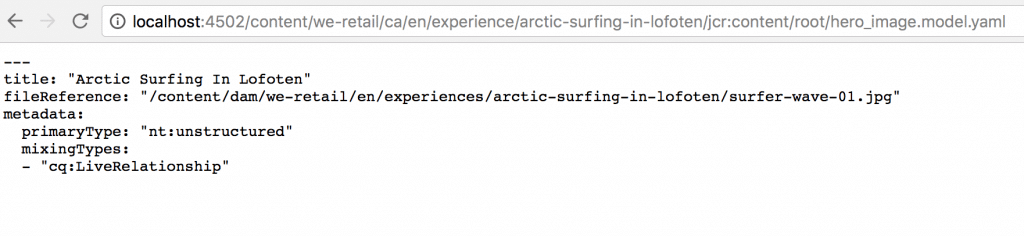
Finally, we are ready to test!
What’s next?
Next, you may want to add annotations support to be able to configure export of the model in the same way you can do with OOTB json export.
You can find the complete example in this repository.